Skip to content
Fully compliant with Phase 2 E-Invoicing (ZATCA)
50% off Limited-time offer on the Invoicing plan

Integrated accounting ERP

Cloud ERP that runs all your business in one place

123ERP brings e-invoicing, sales, inventory, and accounting into one easy, secure interface, with interactive financial reports.

No credit card required
All systems unlocked to try
24/7 technical support
4.8/5 by 150+ clients
  • App interface
  • Create invoice
123 ERP modules on mobile

Seamless data migration

Import from any previous system quickly.

Recorded inside the product: a full invoice in under 18 seconds — click play or the video to watch it full screen.

ZATCA compliant — Phase 1 & 2

14-day free trial — all systems unlocked

Support via WhatsApp and email

E-invoicing compliance in one cloud platform

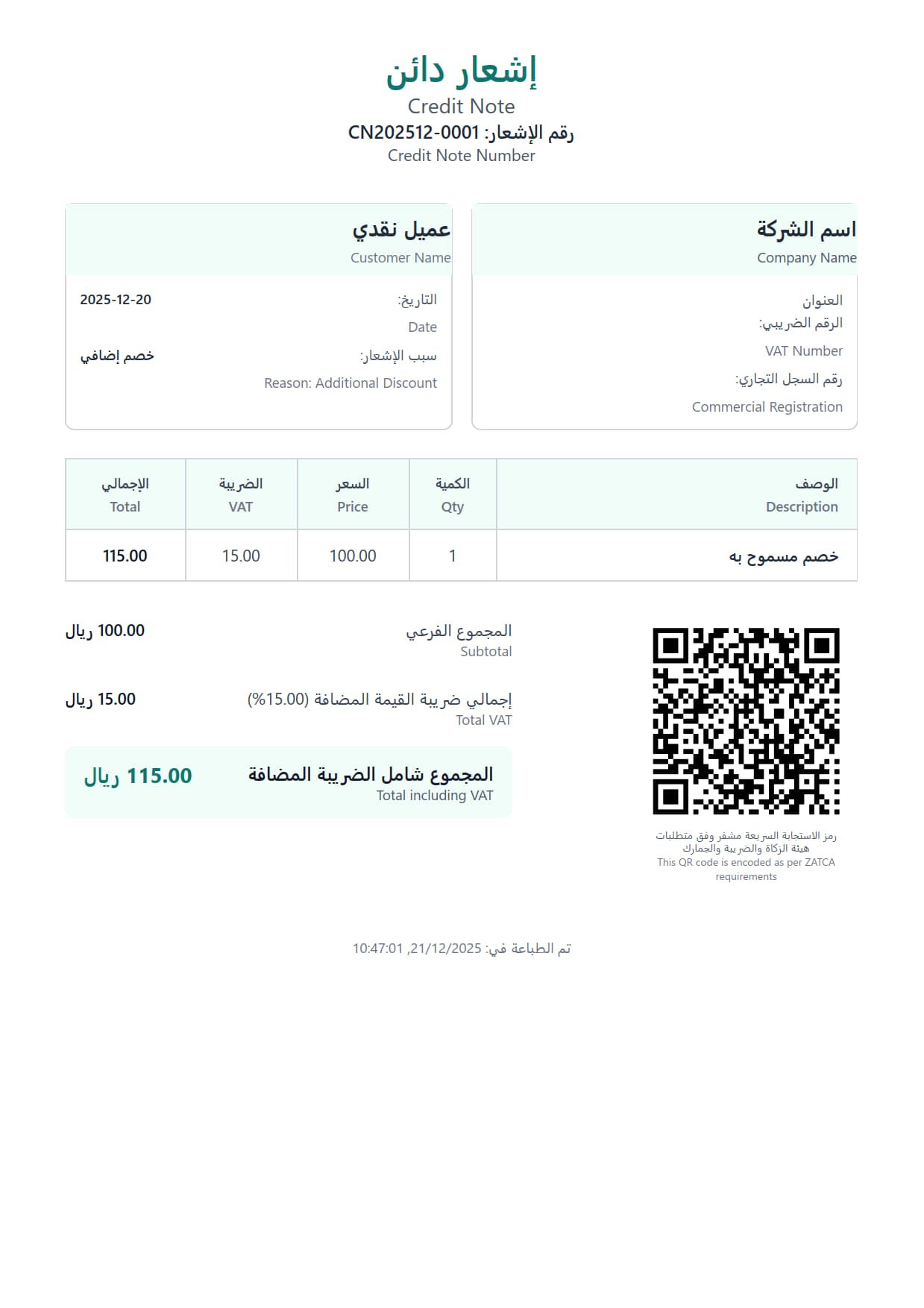
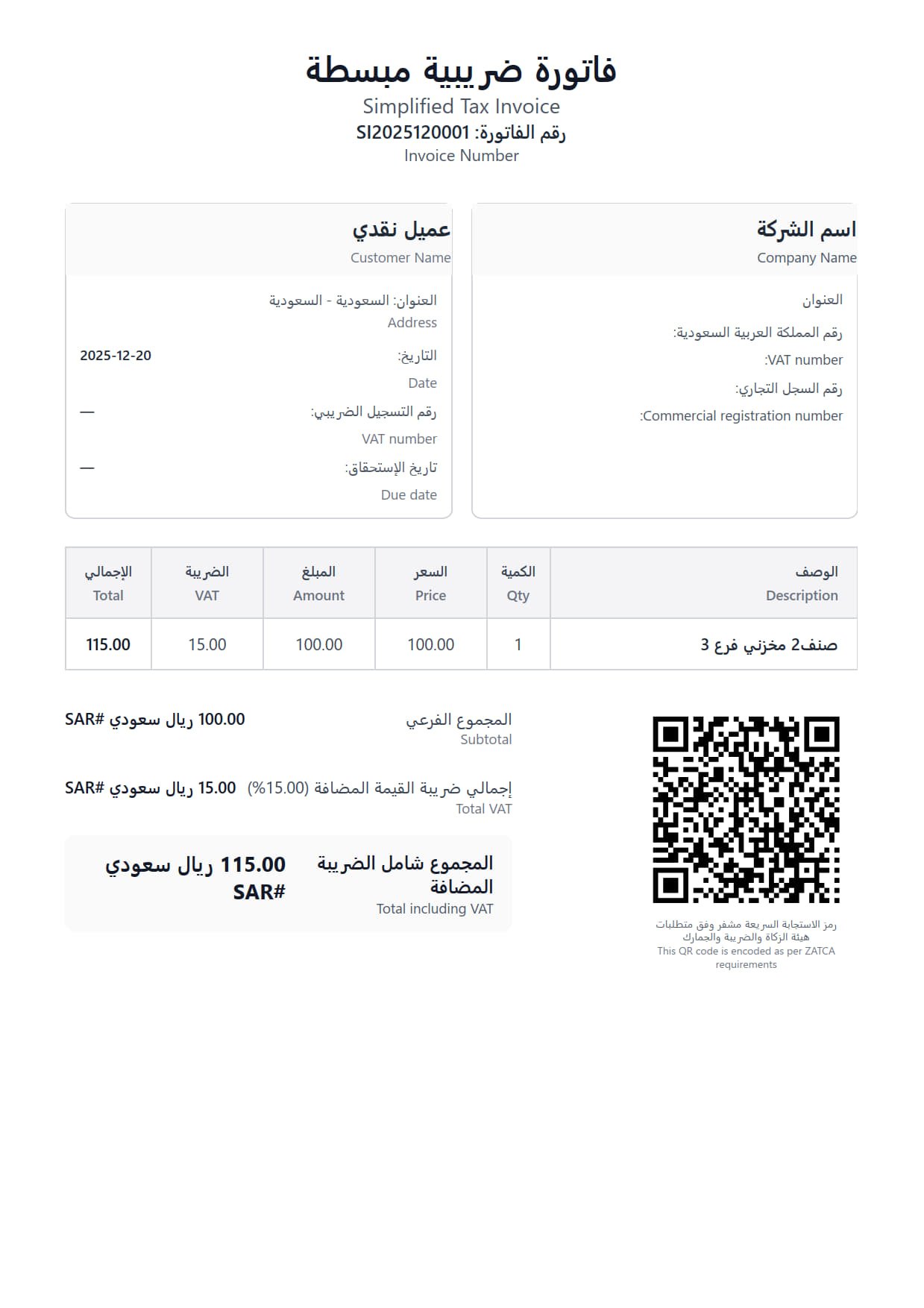
Layered tax invoice preview — ZATCA-ready
Secure & encrypted ZATCA-ready
ZATCA — Zakat, Tax and Customs Authority

Ready for Phase 1 and Phase 2

Integrated with the Fatoora platform and authority requirements: simplified and standard tax invoices, credit and debit notes, encrypted QR Code, and tax reports ready for review.

Manage invoicing devices in Sandbox and Production with a full operations log to support compliance and audits.

Compliance snapshot

✓Invoice + QR — simplified & standard
✓Credit & debit notes
✓Invoicing devices — Sandbox / Production
✓Tax reports
✓Sign & verify
✓Full invoicing log

Meet Basira

Basira, your AI assistant on every screen

Basira brings in-app help, the numbers that matter, and less repetitive work — with security practices suited to business and compliance.

  • Basira on your screen

    Immediate guidance for workflows and accounting without leaving your page.

  • Data-driven clarity

    Surface the figures and KPIs that help you decide faster.

  • Save time

    Cut repetitive steps and focus on running the business.

  • Privacy & security

    Architecture and practices suited to business operations and compliance.

Illustrative example: Basira reads your own figures and answers on the same screen.

Understands Arabic & EnglishReads your company dataExplains entries, suggests next steps

Illustrative example: one word is enough to reach a screen, report, account statement or item card, with no menu hunting.

Inside the product

Barq: type a word, arrive in a second

One search covers the whole product. Instead of walking the menus screen by screen, open Barq and type what you want: it lists the screens and reports, opens a customer, supplier or ledger account statement directly, and reaches an item card by name, code or barcode.

  • One keystroke away

    Ctrl + K or F2 from any screen, or the search button in the top bar.

  • It reads the way you type

    Arabic hamza, taa marbuta and alef maqsura all match interchangeably, and word order does not matter because every word is matched on its own. Works in Arabic and English.

  • Screens and your own records

    Every page, tab and report in the report centre, plus ledger accounts, customers and suppliers by name or code, and inventory items by name, code or any barcode. The result opens the statement or the item card with its movements straight away.

  • Never shows what you cannot open

    User permissions, subscription plan and hidden pages are applied before results are listed, so no result appears that you are not allowed to open.

↑↓ Navigate Enter Open Ctrl+Enter New tab Esc Close

Custody control

Personal custody: every riyal in your employee’s hands is documented

Every employee has their own custody account, and every expense with its receipt goes through approval before it becomes an accounting entry.

Real screenshot (Arabic interface): actual balance, expected balance and pending expenses cards on the Personal custody screen
Real screenshot (Arabic interface): the new custody expense form with a VAT-inclusive amount, project, cost center and attached receipt
Real screenshot (Arabic interface): the approver screen with the expected journal entry and the approve, edit and reject buttons
Real screenshot (Arabic interface): the custody statement with its accounting movements and the print and PDF and Excel export buttons

Real screens from the system with sample data, not client data. Shown in the Arabic interface.

From the phone tooEmployees record their custody and daily transactions from their phone as they happen, and snap the receipt with the phone camera and attach it on the spot.

Personal custody is available from the Business Management plan and up, and is open during the free trial.

Rafiq

Ask about your business. Prepare drafts with Rafiq.

Connect Rafiq to Claude or ChatGPT through MCP to read reports and document details, and prepare drafts to review inside 123ERP before completing them in the section’s form.

  • Connect Claude and ChatGPT

    Use your preferred assistant to talk to 123ERP through MCP.

  • Reports and document details

    Ask for sales, customer statements and stock balances, or find an invoice and read its line items in the same conversation.

  • Drafts ready for your review

    Enable draft creation and ask for an addition in an authorized section. Review it in the Rafiq inbox, then copy the details into the section’s form to complete it.

  • You choose the scope of access

    Choose allowed data categories. Your account and branch permissions still apply, and you can revoke the connection at any time.

Drafts are separate records for review. Rafiq cannot create live department records, approve transactions, or post accounting or stock movements.

300 SAR · one-time

Your conversation, connected to your ERPIllustration
ClaudeChatGPT
MCP 123ERP

Inside Claude or ChatGPT · with draft creation enabled

Prepare a sales invoice draft for me to review in 123ERP

Prepared in the Rafiq inbox

Sales invoice draft

For review
Section
Sales invoices
Content
Proposed details and line items

Review the details, then copy them and open the section’s form to complete the addition.

  1. Review draft
  2. Copy details
  3. Complete in section
Illustrative example. Draft creation must be enabled and requires creation permissions. Saving a draft does not change stock or account balances.

Dashboard customization

Make your dashboard work your way

Choose the metrics and reports that matter to you. Arrange and resize your dashboard widgets to keep your business priorities in view.

  • Move and resize widgets

    Drag widgets into place and adjust their width and height to put the most useful information first.

  • Choose the content, source and colors

    Add metrics, charts, tables and shortcuts. Choose the metric source, period and section color using data available to your permissions.

  • Save your layout and preview each device

    Save a personal layout, preview it for desktop, tablet and mobile, and restore the original design when needed.

Your dashboard, your wayRecorded in 123ERP
Drag sections into placeRecorded in the actual app. Enlarge the preview to see every detail.
Complete platform

The essentials in one system

Explore every module you need to run your business in one system.

New in 123ERP

Recently added features

New

Batch tracking & expiry dates

Track batch numbers and production and expiry dates according to each item’s settings. Count stock by batch and follow batch movements, expired stock and upcoming expiries for items with tracking enabled.

New

Multiple companies

Run more than one company from one account: each company keeps its own accounts, inventory and data, and you choose the company when you sign in.

New

123ERP on your phone

Install 123ERP on your phone’s home screen to open it like an app, and scan barcodes with the camera on the item card, the cashier screen and stock counts.

New

Email inside 123ERP

Inbox and sent mail inside 123ERP, with synchronization, IMAP/SMTP settings, message templates, attachments, and document sending from the system.

New

Electronic menu

A restaurant menu on mobile via link or QR: categories, items, photos and prices, online ordering, plus reservations and feedback according to your settings.

New

Online store

An online store to show your products, categories and prices and receive orders, with order tracking linked to sales and inventory.

Pricing

Choose your plan

From 49 SAR per month — 14-day free trial with all systems unlocked

5% off annual billing · First-time subscribers: an extra exclusive 10% for a limited time (stacked after the annual discount)

50% off

Invoicing Plan

Unlimited sales · purchases up to 30 invoices/month

Limited-time offer −50% 299 SAR / first year instead of 599 SAR · ≈ 25 SAR / month
Start now View plan details
  • ✓ E-invoicing · Unlimited sales · Purchases up to 30 invoices/month
  • ✓ Sales, purchase & VAT reports · Financial operations
  • — No sales orders · PO workflow · supplier quotes · POS · warehouses
  • — 1 user · 1 branch
  • ✓ Attachment storage: 1 GB

Accounting & Inventory Plan

All Invoicing features + warehouses & accounting

over 15% off 999 SAR / year before discount 1,200 SAR
Start now View plan details
  • ✓ All Invoicing plan features
  • ✓ Warehouses & stocktaking · Accounting & cost centers
  • ✓ Sales & purchase reports · GL · VAT · permissions · 2 users
  • ✓ Attachment storage: 3 GB
Most Popular

Business Management Plan

Projects, assets, HR + one module of your choice

over 15% off 1,999 SAR / year before discount 2,400 SAR
Start now View plan details
  • ✓ All Accounting & Inventory features
  • ✓ Projects · Custody & personal custody · Assets · Basic HR · Multi-currency · Offers & discounts
  • ✓ One module of your choice: letters of credit, work orders or maintenance contracts
  • ✓ Restaurant (takeaway) · 3 users · 3 branches · 3 POS
  • ✓ Attachment storage: 5 GB
Most complete

All-in-One Plan

Business Management + loyalty, store & extended restaurant

over 15% off 3,500 SAR / year before discount 4,200 SAR
Start now View plan details
  • ✓ All Business Management features, with letters of credit, work orders and maintenance contracts together; personal custody included
  • ✓ Loyalty points · Customer portal · Online store · Extended restaurant (tables & kitchen)
  • ✓ Advanced HR: payroll runs & GOSI · leaves & loans · end of service · WPS · self-service
  • ✓ One specialized module of your choice: manufacturing, real estate rental, construction, transport or CRM
  • ✓ Dashboard customization
  • ✓ 3 users · 3 branches · 3 POS
  • ✓ Attachment storage: 5 GB

Custom Plan

For companies with custom needs. Priced as you choose; the price appears after you select features.

  • ✓ Solutions tailored to your needs
  • ✓ Users, branches, POS as required
  • ✓ Real estate rental · Construction · Transport · Loyalty points · Extended restaurant · Customer portal · Online store
  • ✓ Rafiq connection with Claude & ChatGPT: 300 SAR · one-time
  • ✓ Attachment storage: Custom
Add user: 250 SAR/year Add branch: 570 SAR/year (after −5% yearly) Add POS: 300 SAR/year 5% annual discount and 10% first-time subscriber offer apply to listed plans; the 10% promo stacks after the annual discount on first paid subscription during the campaign. Prices exclude VAT. Upgrade to a higher plan anytime
Detailed plan comparison Compare features row by row across plans

Swipe left to see all plans

Feature Invoicing Accounting & Inventory Business Management All-in-One Custom
Phase 1 & 2 e-invoicing ✔ ✔ ✔ ✔ ✔
Sales (invoices & quotes) ✔ ✔ ✔ ✔ ✔
Sales orders ✘ ✔ ✔ ✔ ✔
Purchase requests & orders · supplier quotes · purchase notifications ✘ ✘ ✔ ✔ ✔
Credit & debit notes ✔ ✔ ✔ ✔ ✔
Reports center Sales · Purchases · VAT Sales & purchase reports · General ledger · VAT report Full Full Full
VAT return ✔ ✔ ✔ ✔ ✔
Purchases management Up to 30 invoices/month Unlimited ✔ ✔ ✔
Letters of credit & imports ✘ ✘ Pick one ✔ ✔
Warehouses & stocktaking ✘ ✔ ✔ ✔ ✔
Accounting & journal entries · Cost centers ✘ ✔ ✔ ✔ ✔
Permissions management ✘ ✔ ✔ ✔ ✔
Projects · Custody · Assets ✘ ✘ ✔ ✔ ✔
Personal custody (a custody account per employee · approval before the entry · statement) ✘ ✘ ✔ ✔ ✔
Basic HR (employee files · manual attendance · wages, additions & deductions · payroll journal) ✘ ✘ ✔ ✔ ✔
Advanced HR (payroll runs & allowances · GOSI · leaves · installment loans · end of service · WPS · self-service · approvals) ✘ ✘ ✘ ✔ ✔
Manufacturing ✘ ✘ ✘ Pick one ✔
Work orders ✘ ✘ Pick one ✔ ✔
Maintenance contracts ✘ ✘ Pick one ✔ ✔
Fixed assets & depreciation ✘ ✘ ✔ ✔ ✔
Multi-currency ✘ ✘ ✔ ✔ ✔
Offers & discounts ✘ ✘ ✔ ✔ ✔
Real estate rental ✘ ✘ ✘ Pick one ✔
Customer Relationship Management (CRM) ✘ ✘ ✘ Pick one ✔
API ✘ ✘ ✘ ✘ ✔
Spare parts management ✘ ✘ ✘ ✘ ✔
Construction ✘ ✘ ✘ Pick one ✔
Loyalty points ✘ ✘ ✘ ✔ ✔
Customer portal ✘ ✘ ✘ ✔ ✔
Online store ✘ ✘ ✘ ✔ ✔
Restaurant (takeaway) ✘ ✘ ✔ ✔ ✔
Extended restaurant (tables & kitchen) ✘ ✘ ✘ ✔ ✔
Transport & fleet (vehicles · trips · costing & invoicing) ✘ ✘ ✘ Pick one ✔
Dashboard customization ✘ ✘ ✘ ✓ With All-in-One base
Users 1 2 3 3 Custom
Branches 1 1 3 3 Custom
POS ✘ 1 3 3 Custom
Attachment storage (invoices, documents, images) 1 GB 3 GB 5 GB 5 GB Custom
Backup ✔ ✔ ✔ ✔ Custom
Technical support Included Included Included Included Custom
Rafiq — reports and drafts via Claude & ChatGPT ✘ ✘ ✘ ✘ 300 SAR · one-time

“Pick one”: you choose one module from the rows marked this way in that plan’s column.

FAQ

Have a question?

Can I try the system before subscribing?

Yes. A 14-day free trial with no credit card. During the trial all systems and modules are unlocked so you can try the full product (including construction, transport, loyalty points, real estate rental, and CRM). You choose your plan after the trial.

Does the system support multiple branches?

Absolutely! 123 ERP supports multi-branch management with per-branch permissions and centralized inventory and accounting.

Does the system support offers & discounts and multi-currency?

Yes. Multi-currency and offers & discounts are available from the Business Management plan and up: promotions and rewards (such as Buy X Get Y) on sales and POS, plus a base currency, pinned exchange rates, and report display currency.

Is my data secure?

Your data security is our top priority. We use SSL encryption, daily backups, and secure servers to protect your data.

How can I get technical support?

We provide technical support via email and live chat. In the advanced plan, you get 24/7 support with a dedicated account manager.

Can I upgrade or downgrade my plan anytime?

Yes, you can change your plan at any time. The difference will be prorated with your current billing period.

Does the system support e-invoicing (ZATCA)?

Yes, 123 ERP is fully compliant with Phase 1 and Phase 2 e-invoicing (ZATCA). We issue simplified and standard tax invoices with credit and debit notes, encrypted QR Code and Sandbox/Production support and invoice device management.

Can I migrate my data from another accounting system?

Yes, we provide data migration from any previous accounting system or Excel files. Customers, suppliers, items, invoices and records are imported accurately so you can start working immediately without re-entry or data loss.

How much does 123 ERP cost?

Prices start from 49 SAR/month for Invoicing, 99 SAR for Accounting & Inventory, 199 SAR for Business Management, and 349 SAR for the All-in-One plan (3,500 SAR/year). Annual billing is available at discounted rates. All plans include a 14-day free trial.

Is there an offer or discount on the e-invoicing plan?

Yes, a limited-time offer: 50% off the annual Invoicing plan for the first year, 299 SAR instead of 599 SAR (about 25 SAR a month), for new subscribers in Saudi Arabia; it then renews at the regular price. The plan is compliant with ZATCA Phase 1 and Phase 2 and includes unlimited sales, purchases up to 30 invoices a month, and sales, purchase and VAT reports. Prices exclude VAT. Offer details

Can you develop a feature the system doesn’t have?

Yes. We offer features and customizations tailored to your business for an additional fee. We review your request first, then agree on the scope, cost and delivery timeline before work begins.

Contact us about your request

Trusted by companies across sectors · Your trusted partner in digital transformation

Contact us

We're here to help

Our team is ready to answer your questions and help you choose the right plan for your business.

Email

sales@123erp.net

Our Offices

Arab Republic of Egypt

Cairo, 52 El Tayran St.

+20 10 3095 9047

Kingdom of Saudi Arabia

Jeddah, Al-Sitteen St.

+966 53 920 1235

United Arab Emirates

Coming Soon...

Why 123ERP is the best cloud accounting software in Saudi Arabia?

If you're looking for the best cloud accounting software in Saudi Arabia, 123ERP is the complete solution that combines accounting, sales and purchases management, inventory, POS, and HR in one easy-to-use system.

123ERP is the best alternative to Defteri and Wafaq with 30+ integrated modules including offers & discounts and multi-currency, and full support for e-invoicing (ZATCA) Phase 1 and 2, including encrypted QR Code and Sandbox/Production environments.

Whether you run a small shop, medium company, or large enterprise with multiple branches, the system provides advanced tools: fixed assets and depreciation, custody with "My Custody" feature, work orders and projects, payroll, and comprehensive financial reports including trial balance and financial statements.

Start your 14-day free trial with no credit card. Prices start from 49 SAR/month with data migration from any previous accounting system.

Contact us on WhatsApp